How do you add your terms and policies on Shopify?
Policies reassure buyers, and some are required by law or by payment providers. Shopify shows them at checkout; you still need to write them and put them in the menu.
The essentials in 30 seconds
- Open « Policies »
- Set your return rules
- Fill in contact information
- Write the other policies
- Add them to the footer
Avoid: Keeping the template as is: it may promise things you don't do.
See the details with screenshots ↓Step by step
Screenshots show the interface used in the original guide (Shopify in French, Leadpages in English). In your account, buttons appear in your language.
- 1
Open « Policies »
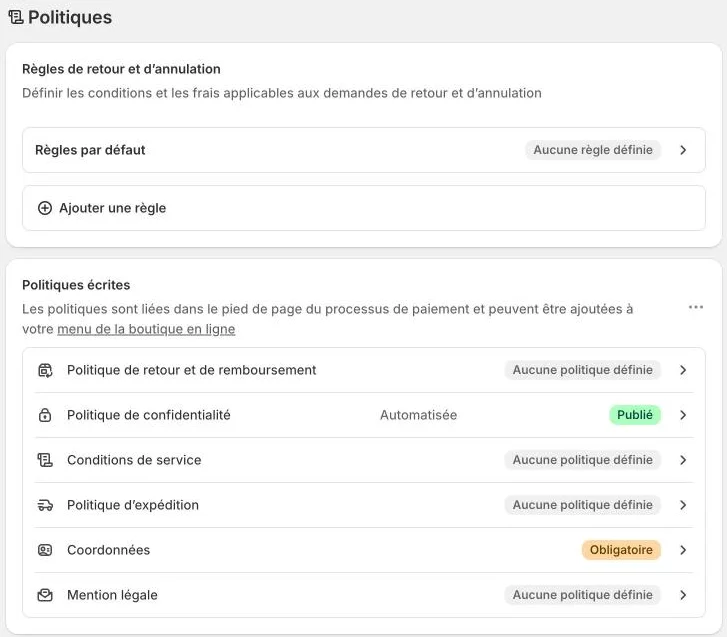
In the admin, click « Settings », then « Policies ». You'll find the return rules and the list of written policies.
- 2
Set your return rules
State the return window, who pays return shipping and how you refund. US law doesn't set one general return period for online purchases, so your policy is what counts: make it clear and stick to it (30 days is common).
- 3
Fill in contact information
« Contact information » is marked required. Enter the business name, address, email and phone: that's what lets customers reach you.
- 4
Write the other policies
Open each policy: return and refund, privacy, terms of service and shipping. If Shopify offers a template, start from it, then adapt each sentence to how you really work. Save.
- 5
Add them to the footer
Policies appear at checkout, but not necessarily in the store. In « Content », then « Menus », open the footer menu and add a link to each one.
Try it yourself
Shopify starts free, then has a discounted launch offer. You can set everything up before paying.
Try Shopify ↗Affiliate link: it does not change the price for you.
Common mistakes
- Keeping the template as is: it may promise things you don't do.
- Policies that don't match your real settings (return window, shipping costs).
- Forgetting the footer link: customers can't find your terms before buying.
Official sources
Get the next guides
New Leadpages, HTML Pub and Shopify guides by email, every two weeks. No spam, unsubscribe in one click.