How do you create a sales page for a Shopify product?
A Shopify product page shows the product; a sales page tells its story. It's most useful when you run ads or make videos for one specific product.
The essentials in 30 seconds
- Get the product ready in Shopify
- Describe the page to the AI
- Link the button to the product
- Add a reason to buy now
- Publish and test on your phone
Avoid: Several products and several buttons on the same page: the visitor hesitates and doesn't click.
See the details with screenshots ↓Step by step
Screenshots show the interface used in the original guide (Shopify in French, Leadpages in English). In your account, buttons appear in your language.
- 1
Get the product ready in Shopify
The product must be active, with its photos, price and inventory. Open it in your online store and copy the page address: that's where the button will lead.
- 2
Describe the page to the AI
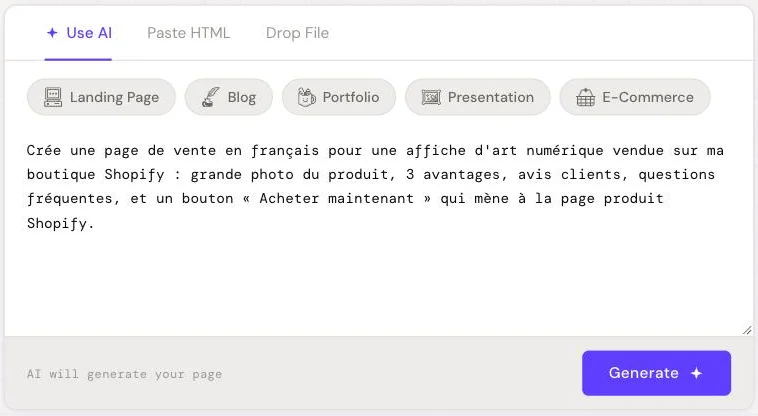
In HTML Pub or Leadpages, create a page with AI and describe it precisely: the product, who it's for, 3 benefits, customer reviews, FAQs and a « Buy now » button.
- 3
Link the button to the product
In the editor, set the button action to « external link » and paste the Shopify product address. You can also paste a Shopify Buy Button into an HTML block.
- 4
Add a reason to buy now
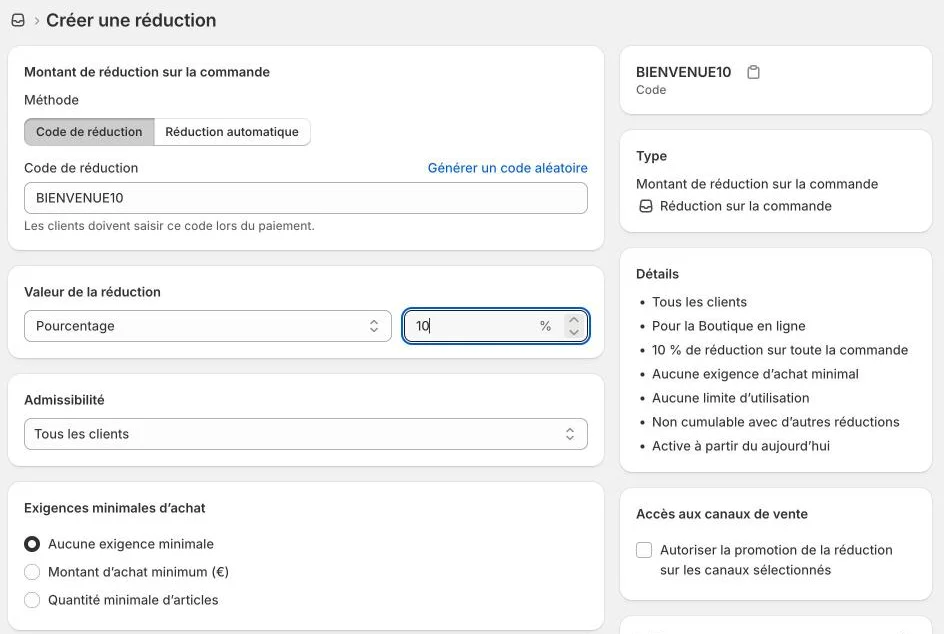
A time-limited discount code, free shipping or a bonus. Create it in Shopify first so it works at checkout.
- 5
Publish and test on your phone
Publish the page, open it on your phone, click the button and go all the way to checkout. Then share the page address in your ads and videos.
Try it yourself
Shopify starts free, then has a discounted launch offer. You can set everything up before paying.
Try Shopify ↗Affiliate link: it does not change the price for you.
Common mistakes
- Several products and several buttons on the same page: the visitor hesitates and doesn't click.
- A button that leads to the store home page instead of the product.
- Made-up customer reviews: only use real ones.
Official sources
Get the next guides
New Leadpages, HTML Pub and Shopify guides by email, every two weeks. No spam, unsubscribe in one click.